Colour sampling outside Photoshop
Here a simple tip that will save time if you need to sample colours from outside Photoshop for use in your artwork.
An admission 
For about two years before I discovered this I used to take screen shots, paste them into Photoshop and then used the Eyedropper tool to get the colour. I tried Apple’s DigitalColor Meter, and even wrote HEX numbers down on pieces of paper.
No more the dunce 
Then a light bulb came on when I accidentally continued to hold my click when selecting with the Eyedropper tool. The Eyedropper tool will let you sample colours from outside Photoshop! Woo hoo! Apparently this is a well know tip but incase anyone else out there is unaware of this I’ve decided to write it up.
How to do it 
Let’s say I want to sample the green used on the Times Online website. With my photoshop document open I need to have the green visible in a web browser outside the photoshop window. Here’s how I set my screen up.
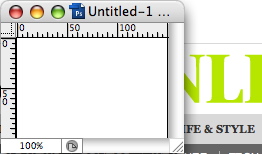
Now you can select the Eyedropper Tool (shortcut I) and click and hold within your photoshop document. You can now drag the Eyedropper tool outside your Photoshop document and sample any colour on your desktop. Watch the video below to see it in action.
Colour Sampling Outside Photoshop from George Ornbo on Vimeo.
You’ll notice the menu appearing before I move the tool to select the colour. If you right click you can choose the sample rate. This is the area that gets sampled. So “Point Sample” is the exact point that you click. This is great for large blocks of colour. “3 x 3 Average” will sample an average of 3 x 3 pixels around the point at which you click. The number gradually increase in the options and increase the sample. If the image you are sampling contains a variety of colours you can either zoom in or use these options to average the colour out.
Tags
Can you help make this article better? You can edit it here and send me a pull request.
See Also
-
Easy image sharpening in Photoshop
Here's a simple tip I picked up to quickly sharpen images in Photoshop using the High Pass Filter. -
Photoshop 101 - Transparent Fills
Photoshop doesn't come with the same one-click ability as Illustrator to make the fill of shapes or objects transparent. Here's a workaround. -
The New Photoshop Logo
I'm not often moved to criticise other designers work. It is their livelihood after all. But the new Photoshop logo falls well short of the mark.