Creating grunge effects in Photoshop
Designing with grids is commonplace in design but the danger is that everything looks a bit ordered. Using grunge effects you can keep your grid and mess up your hair to look a bit cooler.
Designing with grids 
Grids are everywhere in design. Have a look at newspapers for example. The content is ordered in columns and rows so that the eye can easily scan the content. Mark Boulton has written a great series of articles on designing with grids. In it he shows how to use grids to organise information. Speak to any designer and they will tell you that Apple + R is a common shortcut in Photoshop. It brings up rulers which allows you to create your grid in your Photoshop document. You then use rulers as the backbone of the design. Indeed https://www.markboulton.co.uk is a great example of a clean design using a strong grid.
Some clients don’t like straight lines 
A strength and a weakness of using grids and rulers is that everything lines up. The eye can easily follow the grid and find a way to the content. Most designers will have come across a client who does not like neatness. Here you can have two reactions. The first is that grids are good and you should stand your ground. The second is to use effects to subtly break the hardness of the grid without losing the structure.
Time for some grunge 
One approach is to grunge elements within your design. This basically means messing up the carefully styled hairstyle that a grid offers. There are a number of ways that you can add some edge to your designs and thankfully free resources are available. I’m going to be using a set of grunge and scratch brushes from Photoshop Brushes. I’m also going to be using a free grunge font NeoPrint. You can get a copy from here.
Using grunge and scratch brushes 
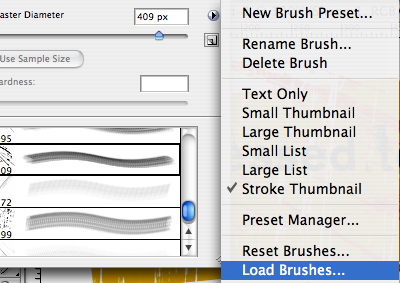
Custom brushes are a great way to break up a hard geometric shape. In this example I’m using a couple of brushes to break up a rounded rectangle. Once you have downloaded the brush set drop it into your brushes folder in Photoshop. You will find this in Presets / Brushes within the Photoshop file structure. To use the brush select the brushes tool and then click the brushes dropdown menu. You will see a flyout menu (see image below) where you can load brushes. Select the brush set you downloaded and you are good to go. Experiment with different brushes to get the desired effect.
Then use the brushes to start breaking up the shape both inside and outside of the curve. You will see that I have rotated the curved rectangle to move it off centre - again this is an attempt to break the rigidity of a grid.
Adding a font 
As mentioned I’m using NeoPrint a great free font. It has a distressed feel to it that works with the scratches and grunge of the shape. With a bit of simple work the effect is done.
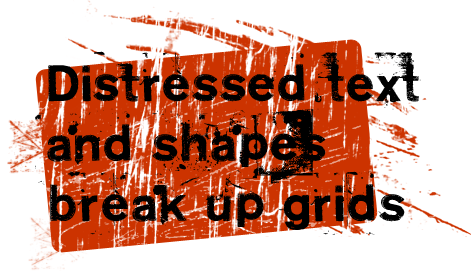
Breaking, or bending grids is simple. Don’t get rid of grids but don’t be constrained by them.
Tags
Can you help make this article better? You can edit it here and send me a pull request.
See Also
-
Concentric text in Photoshop
One day you might just be insane enough to want to write concentric text in Photoshop. It is quite illegible and likely to give you a headache but if you still want to do it read on. -
Creating custom shapes in Photoshop
A less well known feature of Photoshop is that you can create custom vector shapes and use them throughout your designs. Here's an of examples of how to do it. -
Using patterns in Photoshop
Patterns area hidden gem in Photoshop. Here's a short tutorial showing you how to make your own and how to use them in your designs.