Quotations in CSS
Here's a short tutorial on how to style quotes with CSS whilst making sure you use the right XHTML tools for the job.
Quotes on websites 
Following a comment from Andrew at Rickmann Designs this post has been updated to remove the non-semantic div. Hurray!
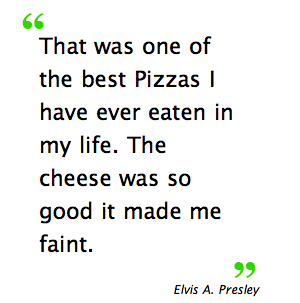
Particularly for a service-based businesses quotes are a great way of showing that you are a trusted and well regarded business. XHTML allows you to mark up a quotes with two tags - the blockquote or quote. But the default styling for these elements is not very inspiring. Thankfully with CSS you can do pretty much anything you want with quotes. This article will explain how to get to the following:
Using the right semantics 
XHTML offers two elements for quotes in the blockquote and quote. Quote is used for inline quotes:
“I like beer” said George.
Blockquote is used for larger quotes:
“Most modern calendars mar the sweet simplicity of our lives by reminding us that each day that passes is the anniversary of some perfectly uninteresting event.”
– Oscar Wilde
There is also the cite element which allows us to assign a citation to the quote.
Markup the example 
Let’s start with some solid markup. Then if we change our mind we can change the styling.
<blockquote>
  <p>
    That was one of the best Pizzas I have ever eaten in my life. The cheese was
    so good it made me faint.
  </p>
</blockquote>
<cite>Elvis A. Presley</cite>
Sprinkle in some CSS 
Then we add the some CSS:
blockquote p {
  padding: 0px 15px 0px 0px;
  font-size: 1.2em;
  float: left;
  background: url(../images/quote_down.png) bottom right no-repeat;
}

blockquote {
  padding: 20px;
  font-size: 1.8em;
  background: url(../images/quote_up.png) top left no-repeat;
}

cite {
  font-size: 1.2em;
  float: right;
}
This applies the quotation marks to the top left and bottom right of the quote. The citation is floated right. And that’s it! I combine this with a PHP script that produces random quotes.
View the example and download the source code here.
This code has been tested and works in the following browsers
- Win IE5-7
- Win Firefox 1.0-2
- Win Opera 7-9
- Win Netscape 6-8
- Mac Safari 2
- Mac Firefox 1.0-2
- Mac Camino 1
- Mac Opera 9
Tags
Can you help make this article better? You can edit it here and send me a pull request.
See Also
-
Default Styles for CSS
Coding CSS can quickly run into difficulties with different browsers interpreting code in different ways. Designs will never look the same in every browser but you can help yourself by using a default style set when you start coding. -
Book Review: CSS Cookbook - Christopher Schmitt
CSS Cookbook is a solid practical guide to using CSS on a day to day basis. A great book for a beginners, it shows how to resolve common CSS problems. -
Drop Shadows with CSS
A short tutorial showing how to apply drop shadows to images on your site with CSS.