Instant Rails dev environments with Tmuxinator and Foreman
How to start an entire development environment with a single command
The problem 
To begin working on a Rails app I need to do things like starting a server, starting a console, ensure background processes are running, start a terminal window so I can watch logs, start a text editor etc etc.
Doing all this is tedious. Wouldn’t it be nice if we could just do something like?
start_myapp
Well you can!
Tmux 
Tmux is a ’terminal multiplexer’. What the hell’s that? It basially allows you to create terminal sessions - similar to GNU Screen where you can detach from a session and come back later. If you are not familiar with tmux there are a few good resources available
- A quick tmux (terminal multiplexer) screencast (a better GNU screen)
- Love, hate, & tmux
- TMUX - The Terminal Multiplexer (Part 1)
- TMUX - The Terminal Multiplexer (Part 2)
You can install tmux with homebrew
brew install tmux
It takes a little reading and configuring but is well worth effort if you are a heavy terminal user.
Tmuxinator 
Tmuxinator is an excellent gem that lets you define the layouts of your tmux sessions.
You can install tmuxinator from RubyGems
gem install tmuxinator
By defining a yaml file we can layout things exactly how we want them.
project_name: myapp
project_root: ~/Sites/myapp
tabs:
  - zsh:
  - vim: vim .
  - foreman: bundle exec foreman start
  - git: git pull
  - console: bundle exec rails console
  - server: bundle exec rails server
  - logs: tail -f log/development.log
Then you can start your session with start_myapp and your layout will be ready
for you. Here’s a screenshot from the documentation:
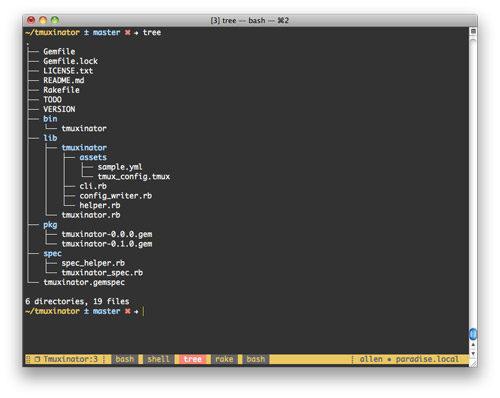
There’s excellent documentation on using tmuxinator in the project README
Foreman 
Enter the final piece of the jigsaw - foreman. Foreman is a gem that lets you manage background processes associated with your application through a Procfile. You just add any processes you want to be started into the Procfile and you are done. Here’s an example
worker: bundle exec rake resque:work QUEUE=sweep_orders
apn_sender: bundle exec rake apn:sender
resque_scheduler: bundle exec rake resque:scheduler
resque_web:
  bundle exec resque-web --foreground --server thin --port $PORT --no-launch
sphinx: bundle exec rake ts:run_in_foreground
You can then start these process by running
foreman start
The processes will run in the foreground and spit out any logs messages to standard output - perfect for development.
Using foreman you can add a tab to tmuxinator that will start your processes and have a nice log of what they are doing. We have a neat way of starting any background processes in our app within the context of our unified tmux development environment.
So with one command we can set things up exactly the way we want and get straight into developing.
Alternatives 
This technique will also work well for screen and regular terminal users with the Screeninator and Terminitor gems so if you are not sold on tmux you can still use it.
Tags
Can you help make this article better? You can edit it here and send me a pull request.
See Also
-
Building a Rails server with Puppet
A short write up of my experience learning and configuring Puppet to build and manage servers to serve Rails applications. -
Getting email through spam filters from a Rails App
Recently I did some work on ideapi a Rails app that was consistently delivering email to spam folders of major email providers. After the work email is consistently delivered to Gmail, Google Hosted Accounts, Hotmail, Yahoo and AOL Mail. Here are the details on how it was achieved. -
Developing subdomain Rails sites locally
Developing local Rails sites with subdomains can be a pain but thanks to a couple of public URLs it can be much simpler.