Firebug is simply brilliant
Software comes and goes and rarely is there a piece of 'must have' software. Firebug, an extension for Firefox, deserves to be to be heralded as an outstanding piece of software and something no web developer should be without.
Making web development easier 
Every once an a while a thing of beauty comes along that makes your life easier. The switch from Windows to Mac is one example. Firebug 1.0 beta has given me the same warm glow. Quite simply it is a brilliant piece of software that will help developers to examine, test and debug web pages.
Firebug 1.0 ups the ante 
I’ve been using Firebug since the early releases primarily as a debugging tool for Javascript and to watch AJAX calls and repsonses. Firebug 1.0 beta takes Firefox extensions to an entirely new level. Here a quick tour of some of the features. Go and download it and once you’ve been amazed make sure you donate.
The box model laid bare 
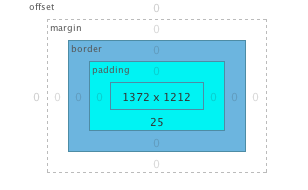
Not sure why an element is out of line? No problem. Click on HTML and then in the right hand box choose Layout. Then click inspect and finally on any element on the page. You will see the offset, margin, border and padding for that element. Not only that but you can edit the numbers and see the changes live on the page!
Page load 
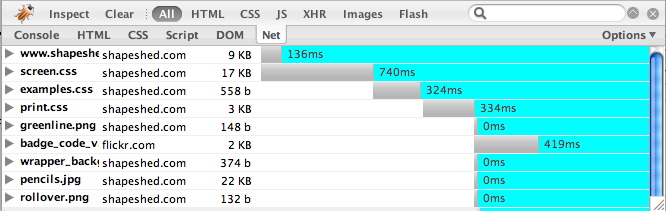
Need to find out which elements of your page are causing a slow load time? Click on Inspect and then Net and you will a list of files with the load time next to them, as well as the load order of the page. As if that’s not enough you can double click to see the headers.
Live Edit HTML and CSS 
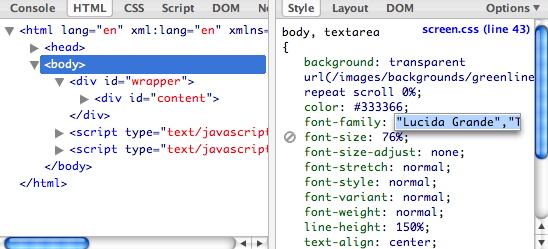
Why go to the trouble of opening up a text editor when you can live edit the page? Click on HTML and you will see two panes. The HTML is on the left and the CSS is on the right. Dive in and edit the code and see the changes rendered on the page.
Javascript and AJAX 
Firebug features a great Javascript debugger and a tool to watch AJAX calls go back and forth. For the AJAX tool click Net and then XHR.
Doing the DOM 
As if that isn’t enough there is a comprehensive DOM inspector. You can look at a document any way you like. It is a great help in constructing scripts and debugging in general.
Quality control 
Just having Firebug running is a great way to have automated quality control on your code. Sat next to Chris Pederick’s Web Developer Toolbar you should be able to quickly pick up any HTML, CSS and Javascript errors. After loading a page if you see any red click on the icon and you will quickly see what is wrong.

Enjoy it and then give some love back 
Two things you should do after reading this
- Download Firebug 1.0 beta
- Donate to the genius that is Joe Hewitt.
Tags
Can you help make this article better? You can edit it here and send me a pull request.
See Also
-
Writing good XHTML and CSS Part 2
The second in a series of good practices for writing XHTML and CSS looking at writing clean, maintainable code and dealing with browser hell problems. -
Writing good XHTML and CSS Part 1
In two articles I’m going to outline my opinion on what you need to understand and write high quality XTHML and CSS. The articles will focus on producing code that stands up to the rigors of the web and future proofs code. The articles are aimed at coders starting out and looking to get to grips with writing professional front end code. Of course if you don’t agree with something the comments box is there for you to add your opinion. In part 1 I’m going to look at what you need to get off the ground. -
CSS Font Size not inherited in IE tables
I recently came across a problem that I couldn't find a solution to. In IE6, IE5.5 and IE5 text within tables was not inheriting the font declarations from my CSS. I declared the font size on the body tag and for all other elements it works fine: